Built by first responders, for first respondersSupportLog in
The Unified Solutions Platform
The EMS Platform Built for Your Agency
One login. One powerful dashboard. PCR, CAD, Crew Scheduling, Drug Tracking, Truck Checks, HR, Inventory, Fleet Management, and Billing all in one place. Your first app is free. Seriously.
Pick any app in our platform: PCR, CAD, Crew Scheduling, Drug Tracking, Truck Checks, HR, Inventory, Fleet Management, or Billing. Use it free. Full features. Full support. No payment info. No expiration.
We'd Rather Build Relationships
The industry is full of vendors who lock you into contracts before you've seen the product work. We think that's backwards. Try us first. If we deliver, you'll stay.
No Contracts. No Pressure.
We earn your business by delivering results, not through long-term agreements. Your success is our business model. If the software doesn't work for you, you owe us nothing.
A Local EMS Liaison, Not a Call Center
Every agency gets a dedicated liaison who knows your community and your operations. Not a 1-800 number. A real person who's worked in EMS and understands your challenges.
4:08
See the platform in action
Watch a short tour of how the apps fit together, from the dispatch screen to the patient chart to the paid claim.
Everything your agency runs on
Pick the apps you need today. They are built to work on their own and even better together.
Connect all your EMS systems through a single platform. One login gives you access to everything, eliminating data silos and streamlining your workflow.
Single sign-on: one login for CAD, ePCR, billing, scheduling, and every other module
No duplicate entry: information entered once flows automatically to every system that needs it
Connected data: patient care, incident details, and billing all share the same database
Real-time updates: changes in one module instantly appear across all connected systems
Unified
Works on Any Device, Anywhere You Work
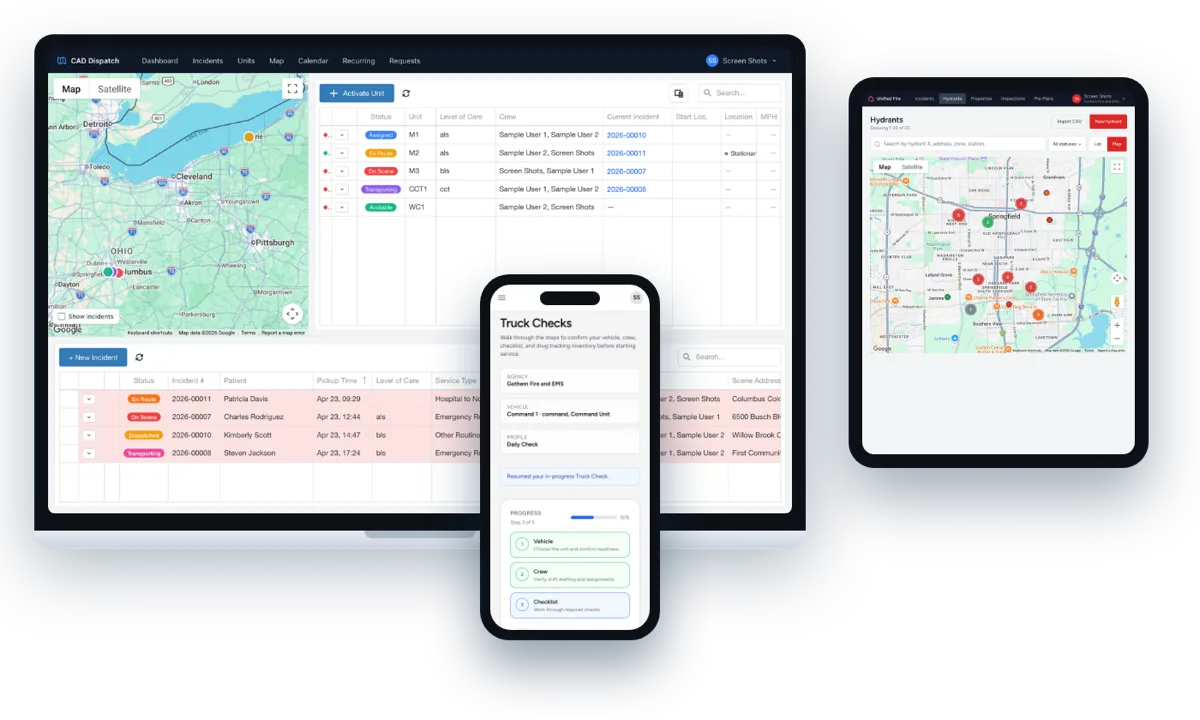
Access your complete EMS platform from desktop, tablet, or mobile. Our responsive design ensures full functionality across all devices, so your team can work from anywhere.
Cross-Platform Design
Use the devices you already have, no expensive hardware required. Works seamlessly on Windows, Mac, iOS, and Android.
No Hardware to Buy
Use the devices your team already owns. Windows, Mac, iOS, and Android all work, with no special equipment required.
Desktop, tablet, or mobile, your platform goes where you go.
Pricing
Prices published, nothing hidden
Designed for EMS. We believe in straightforward pricing that grows with your agency, not against it.
Your First App Is Free
Get started with any of our powerful applications completely free. Experience the difference Unified Solutions makes without any upfront cost.
Guaranteed Price Match
We're confident in our value. If you find a comparable solution with better pricing, we'll match it. We want you to have the best tools at the best price.
Bundle Discounts Available
Combine multiple Unified Solutions applications and unlock significant savings. Build a comprehensive suite tailored to your agency's needs and budget.
See application-specific pages for a la carte pricing.
What's new
The latest features and enhancements across the platform.
Analytics
Hours and Overtime: pick a single pay period
The Hours and Overtime report under Personnel has a Pay period picker next to the 4w, 8w, 13w and 26w range buttons. Leave it on All periods in range, or choose one period to see just that month, half month or week. The overtime split now uses your agency's own Overtime after setting from Crew Scheduling instead of a fixed 40 hours, and the subtitle shows the number in use. The Weeks column shows how many weeks each period really covers, so a monthly period reads 4 or 5 rather than 1.
Dispatch notes on each facility
A facility's page in Settings has a new Dispatch notes box for what dispatch and crews need to get in: Knox box location, door codes, hazards, which entrance to use. It saves as you type. CAD shows the notes on every trip to or from that facility, and crews see them on the trip in the Unified app. The notes never go on a chart.
CAD
Dispatch notes on facilities: Knox box, door codes and hazards on every trip
Each facility on your list can now carry dispatch notes, such as where the Knox box is, the door code, which entrance to use, or a hazard on site. Add them once on the facility in Unified Settings, or in CAD Settings if your agency still keeps its facility list in CAD, and they show automatically on every trip that picks up or drops off there: in a yellow box under the facility on the trip form, in the trip quick view, on the emergency call alert, and under Scene and Destination on the crew's trip in the Unified app. Change the notes once and every trip shows the new text. The notes never go on the chart.
CAD
Municipality and county on every trip
CAD now shows the municipality and county for a trip's scene and destination, the same way CloudPCR does: in the trip quick view, on the trip form under the city, on the call alert, and as Municipality and County columns you can turn on in the dashboard lists and on the Incidents page. You can search the trip lists by municipality. Townships are named as the state records them, for example Township of Hempfield, so a trip in Hempfield Township shows up as that even when the street address says Greensburg.
CAD
See and change a unit's post while it is En Route to Post
When a unit is En Route to Post or At Post, the dashboard unit list now shows which post next to the status, and the Post column can be turned on from the column chooser. To send the unit somewhere else, open the unit's menu and pick Change post. Before this you could not see the post from the dashboard and had to mark the unit At Post before you could change it.
CAD
A running timer shows how long each unit has been in its status
The dashboard unit list has a new Timer column that counts up from the moment a unit entered its current status, so you can see at a glance that a crew has been At Scene for 23 minutes or En Route for 4. The trip list has the same column for the time since dispatch. The timers tick in place without refreshing the page. The column is hidden to start, so turn it on from the column chooser.
CAD
Move and resize columns, drag a trip from anywhere on its row
On the dashboard unit list, the dashboard trip list and the Incidents page you can now drag a column header to reorder it and drag the edge of a header to resize it. Resizing takes the space from the column next to it, so the table always stays inside its pane. Your column order, widths and hidden columns are remembered for you on every computer you sign in from. To assign a trip, click and hold anywhere on its row and drop it on the unit; while you drag, the row shrinks to a small tag with the trip number and patient so you can see the unit you are dropping it on. The small grip handle only appears on touch screens, where it keeps the list scrollable. Trip rows are cleaner too: the PCS badge and the round-trip leg tag have moved off the row and stay in the trip quick view and trip window.
CAD
Dispatch alerts show in one window and clear everywhere
If you keep CAD open in more than one browser window or on more than one monitor, a new call alert now opens in just one of them, the window you used last. Dismissing it there clears it on every other window signed in as you, so nobody has to close the same alert four times. Click into another window and the alert moves with you.
Transport Portal
Pick the pickup and drop-off place from your agency's facility list
The New transport request form now has a Choose a facility box on both the Pickup and Drop-off sections. Search your transport agency's list of hospitals, nursing homes and clinics, tap one, and the name and full address fill in for you. Every field stays editable, and you can still type any place by hand, including a patient's home address, when it is not on the list. If you sign in with an account that is not yet set up as a requesting facility, the form now tells you so instead of showing a time picker you cannot use.
Transport Portal
Attach the PCS to a transport request
A facility can now attach the signed PCS and other patient documents to a transport request, on the request form or on the request page while it is open, by dropping the file in. Each document carries its type, an effective date and an expiry date (PCS is good for 60 days unless you say otherwise). When the agency approves the request, the documents are filed on the patient's record so they go out with every chart and trip, and the request timeline shows when that happened. Documents can be removed until the request is approved.
Unified Billing
Patients linked to their CloudPCR record, corrections flow both ways
When a CloudPCR chart arrives, Billing now links the claim's patient to the agency's CloudPCR patient record, matching on name, date of birth and the details you already reconcile on. The patient page shows a CloudPCR patient chip for each linked agency. A correction a biller makes to a linked patient's name, date of birth, address, phone, SSN or insurance reaches CloudPCR, so the next trip and chart start with the right details, and a change made in CloudPCR comes back to Billing. Nothing changes for agencies that are not on CloudPCR.
CAD
PCS on file: see and add patient documents from the trip
Every trip now shows whether the patient has a current PCS: PCS until a date, PCS expires in a few days, PCS expired, or No PCS on file for non-emergency trips. The badge sits on the trip window, the trip list and board, the quick view and the calendar cards. Under the patient on the trip window, a Documents panel lists the patient's documents with View and Replace, and an Add document drop zone lets the dispatcher file the PCS the facility sent while booking the trip; it attaches itself to the chart when the trip starts. Settings, Patients has the same Documents tab. Dispatch keeps a patient's insurance history too: a policy that changes on a trip ends the old one instead of deleting it.
Frequently asked questions
Can we start with just one app?
Yes. Most agencies start with the app that solves their most pressing problem, then add others over time. Your login and your data carry over as you grow into the suite.
Do the apps actually work together?
They do. Every app shares the same users, companies, and data, so a dispatch becomes a patient care report, which becomes a claim, without anyone re-keying information.
Is patient care reporting NEMSIS compliant?
Yes. Patient Care Reporting uses NEMSIS v3.5 forms and submits directly to state repositories, so your documentation stays compliant and audit-ready.
How do we get started?
Request a demo and tell us which apps you are interested in. We will set up a walkthrough tailored to how your agency operates.
See the platform in action
Tell us which apps you are interested in and we will set up a walkthrough tailored to your agency.